
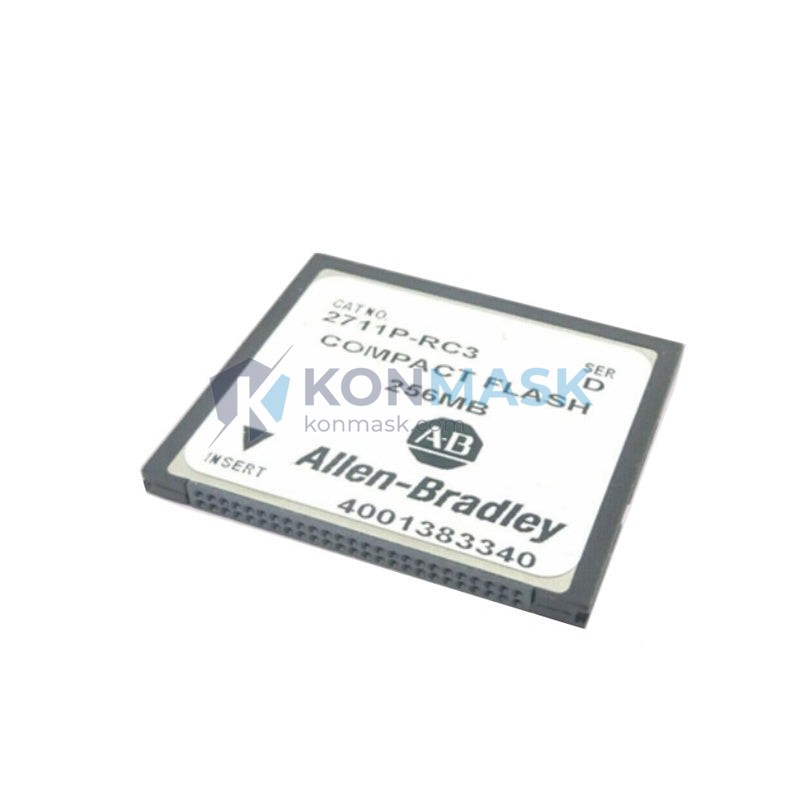
Allen-Bradley 2711P-RC3 External CompactFlash Card – PanelView Plus/CE Series
When an HMI terminal loses its storage medium mid-shift, the consequences cascade fast: operators lose access to runtime applications, alarm histories vanish, and production lines halt while maintenance scrambles for a replacement. In process-critical environments — food & beverage lines, water treatment SCADA panels, automotive assembly cells — even a 30-minute unplanned downtime can cost tens of thousands of dollars. The Allen-Bradley 2711P-RC3 External CompactFlash Card eliminates this single point of failure by providing a robust, field-replaceable non-volatile storage solution engineered specifically for the PanelView Plus and PanelView CE terminal family.
Within the 2711P accessory ecosystem, the 2711P-RC3 occupies the role of primary external storage expansion — enabling operators to store application files, recipe data, alarm logs, and firmware images outside the terminal’s internal memory. As Rockwell Automation’s PanelView Plus platform remains one of the most widely deployed HMI families in global discrete and process manufacturing, the 2711P-RC3 continues to be a mission-critical spare part stocked by maintenance teams across North America, Europe, and Asia-Pacific.
Technical Specifications
- Part Number: 2711P-RC3
- Manufacturer: Allen-Bradley / Rockwell Automation
- Product Family: PanelView Plus / PanelView CE
- Form Factor: External CompactFlash (CF) Card
- Interface: CompactFlash Type I/II slot on 2711P terminals
- Compatible Terminal Series: 2711P (PanelView Plus 6, PanelView Plus 7 Standard)
- Weight: 1,200 g (packaged)
- Condition Available: New / Surplus New / Refurbished
Note: Rockwell Automation does not publish all internal CF card specifications publicly. Consult the 2711P terminal user manual or contact Konmask.com for application-specific guidance.
Key Features & Benefits
- Field-Replaceable Storage: Swap the CF card without removing the terminal from the panel door — minimizing MTTR in live production environments.
- Non-Volatile Memory: Retains application files, recipes, and alarm logs through power cycles and unexpected shutdowns.
- OEM-Engineered Compatibility: Designed and validated by Rockwell Automation for 2711P terminals — eliminates compatibility guesswork associated with generic CF cards.
- Extended Data Retention: Industrial-grade flash memory suited for the temperature and vibration profiles of panel enclosures.
- Firmware & Application Portability: Supports transfer of FactoryTalk View ME application files between terminals for rapid commissioning or replacement.
- Genuine Rockwell Part: Sourced from authorized channels — traceable, documented, and backed by Konmask.com quality verification.
Industry & Equipment Applications
- Discrete Manufacturing: Automotive assembly lines, packaging machinery, and press control panels using PanelView Plus HMIs.
- Process Industries: Chemical, oil & gas, and water/wastewater SCADA stations requiring reliable alarm and trend data storage.
- Food & Beverage: Recipe management systems where CF card portability enables rapid product changeovers.
- Material Handling: Conveyor and sortation system HMI panels in distribution centers.
- OEM Machine Builders: Spare parts kits for PanelView Plus-based machine platforms shipped globally.
- MRO & Maintenance Teams: Critical spare stocked alongside 2711P terminals to ensure sub-hour recovery from storage failures.
System Integration & Compatible Parts
The 2711P-RC3 is designed for use with the Allen-Bradley 2711P PanelView Plus terminal series. Commonly integrated alongside:
- 2711P-T7C21D8S — PanelView Plus 7 Standard 7″ Touch Terminal
- 2711P-T10C21D8S — PanelView Plus 7 Standard 10″ Touch Terminal
- 2711P-RDK7C — PanelView Plus 6 700 Replacement Display Kit
- 2711P-RP8D — PanelView Plus 6/7 Replacement Processor
- 2711P-RN15S — PanelView Plus EtherNet/IP Communication Module
- 1756-L71 / 1756-L73 — ControlLogix PAC controllers commonly paired with PanelView Plus HMIs
For system architecture questions or multi-part BOM inquiries, contact our technical team at support@konmask.com.
Our Quality Assurance Process
Every 2711P-RC3 unit shipped from Konmask.com passes through a documented inspection workflow:
- Visual Inspection: Connector pins, housing integrity, and label verification against Rockwell Automation part markings.
- Authenticity Check: Cross-referenced against known OEM packaging and date code patterns to screen for counterfeit parts.
- Functional Verification (where applicable): Surplus and refurbished units are tested for read/write integrity prior to dispatch.
- Secure Packaging: Anti-static packaging with moisture barrier for international shipments.
- Documentation: Certificate of conformance and inspection report available upon request.
How to Order
- Submit an RFQ: Email support@konmask.com with your required quantity, delivery timeline, and destination country.
- Phone/WhatsApp: +0086 19859288691 — available for urgent inquiries and technical pre-sales questions.
- Online Inquiry: Use the contact form on Konmask.com to submit your BOM or single-line request.
- Lead Time: In-stock units typically ship within 1–3 business days. Ex-stock and sourced units quoted individually.
- Payment Terms: T/T, PayPal, and trade finance options available for qualified buyers.
Why Choose Konmask.com?
- Industrial Automation Specialists: We focus exclusively on PLC, DCS, HMI, and drive components — not a generalist marketplace.
- Global Sourcing Network: Access to new, surplus-new, and refurbished Rockwell Automation inventory across multiple supply channels.
- Technical Pre-Sales Support: Our team includes engineers with hands-on experience in Allen-Bradley system integration.
- Competitive Lead Times: Stocked items ship same or next business day from our warehouse.
- Trusted by MRO & OEM Buyers: Serving industrial procurement teams across Asia, Europe, and the Americas.
- Transparent Documentation: Full traceability documentation provided on request — no black-box sourcing.
Frequently Asked Questions
Q: Is the 2711P-RC3 compatible with PanelView Plus 7 terminals?
A: The 2711P-RC3 is designed for the 2711P PanelView Plus/CE terminal family. Compatibility with specific PanelView Plus 7 models depends on the terminal’s CF slot configuration. Contact us with your exact terminal part number for confirmation.
Q: Can I use a standard commercial CompactFlash card instead of the 2711P-RC3?
A: While some commercial CF cards may function, Rockwell Automation recommends OEM-specified media to ensure compatibility with FactoryTalk View ME and to avoid data corruption risks in industrial environments. The 2711P-RC3 is validated for this application.
Q: What data can be stored on the 2711P-RC3?
A: The card supports storage of FactoryTalk View ME application files, alarm and event logs, recipe data, and firmware images — depending on terminal configuration and software version.
Q: Do you supply both new and refurbished units?
A: Yes. Konmask.com can supply new (factory-sealed), surplus-new (unused, open box), and refurbished (tested) units. Condition and pricing are confirmed at the time of quotation.
Q: How do I transfer my application to a new CF card?
A: Application transfer is performed via FactoryTalk View ME software or directly through the terminal’s file manager. Our technical team can provide guidance — contact us at support@konmask.com.
© 2026 Konmask.com. All rights reserved.
Original Source: https://Konmask.com
Contact: support@konmask.com | +0086 19859288691
{
“@context”: “https://schema.org”,
“@graph”: [
{
“@type”: “Product”,
“name”: “Allen-Bradley 2711P-RC3 External CompactFlash Card”,
“description”: “Allen-Bradley 2711P-RC3 External CompactFlash Card for PanelView Plus and PanelView CE HMI terminals. OEM-specified non-volatile storage for FactoryTalk View ME applications, alarm logs, and recipe data.”,
“sku”: “2711P-RC3”,
“mpn”: “2711P-RC3”,
“brand”: {
“@type”: “Brand”,
“name”: “Allen-Bradley”
},
“manufacturer”: {
“@type”: “Organization”,
“name”: “Rockwell Automation”
},
“category”: “HMI Accessories > CompactFlash Storage”,
“url”: “https://konmask.com/products/allen-bradley-2711p-rc3-compactflash-card-panelview-plus”,
“offers”: {
“@type”: “Offer”,
“url”: “https://konmask.com/products/allen-bradley-2711p-rc3-compactflash-card-panelview-plus”,
“priceCurrency”: “USD”,
“availability”: “https://schema.org/InStock”,
“seller”: {
“@type”: “Organization”,
“name”: “Konmask.com”,
“url”: “https://konmask.com”
}
}
},
{
“@type”: “FAQPage”,
“mainEntity”: [
{
“@type”: “Question”,
“name”: “Is the 2711P-RC3 compatible with PanelView Plus 7 terminals?”,
“acceptedAnswer”: {
“@type”: “Answer”,
“text”: “The 2711P-RC3 is designed for the 2711P PanelView Plus/CE terminal family. Compatibility with specific PanelView Plus 7 models depends on the terminal’s CF slot configuration. Contact us with your exact terminal part number for confirmation.”
}
},
{
“@type”: “Question”,
“name”: “Can I use a standard commercial CompactFlash card instead of the 2711P-RC3?”,
“acceptedAnswer”: {
“@type”: “Answer”,
“text”: “While some commercial CF cards may function, Rockwell Automation recommends OEM-specified media to ensure compatibility with FactoryTalk View ME and to avoid data corruption risks in industrial environments. The 2711P-RC3 is validated for this application.”
}
},
{
“@type”: “Question”,
“name”: “What data can be stored on the 2711P-RC3?”,
“acceptedAnswer”: {
“@type”: “Answer”,
“text”: “The card supports storage of FactoryTalk View ME application files, alarm and event logs, recipe data, and firmware images — depending on terminal configuration and software version.”
}
},
{
“@type”: “Question”,
“name”: “Do you supply both new and refurbished units?”,
“acceptedAnswer”: {
“@type”: “Answer”,
“text”: “Yes. Konmask.com can supply new (factory-sealed), surplus-new (unused, open box), and refurbished (tested) units. Condition and pricing are confirmed at the time of quotation.”
}
},
{
“@type”: “Question”,
“name”: “How do I transfer my application to a new CF card?”,
“acceptedAnswer”: {
“@type”: “Answer”,
“text”: “Application transfer is performed via FactoryTalk View ME software or directly through the terminal’s file manager. Our technical team can provide guidance — contact us at support@konmask.com.”
}
}
]
}
]
}