
Allen-Bradley 2711P-RP9DK – PanelView Plus 6 Logic Module | PanelView Plus 6 Platform
Engineering Background
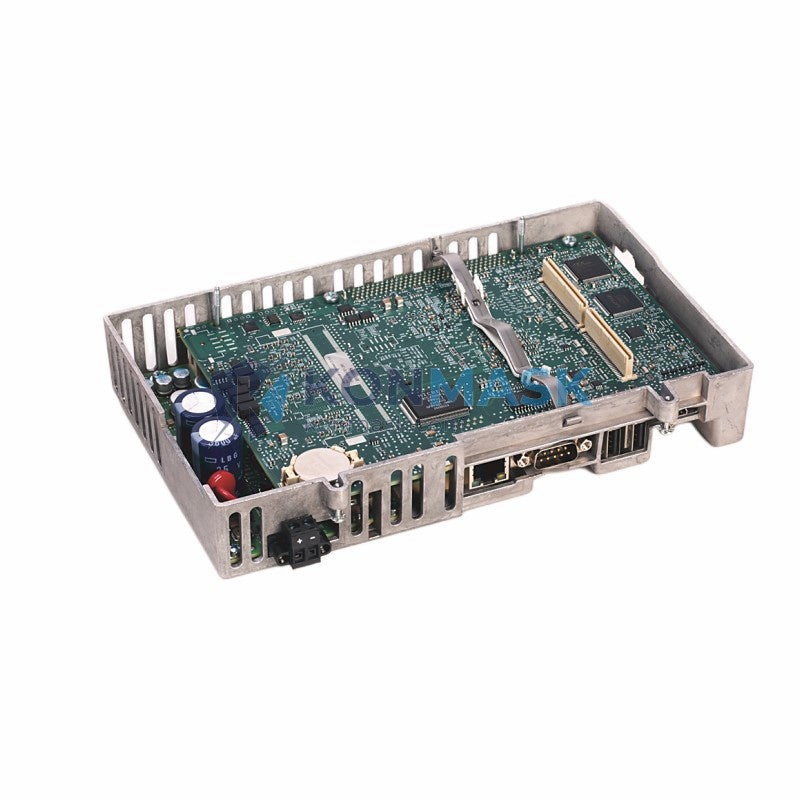
The Allen-Bradley 2711P-RP9DK is the dedicated logic module (Run-time Processor) for the PanelView Plus 6 family of Human-Machine Interface (HMI) terminals, developed by Rockwell Automation. As the computational core of PV+ 6 terminals, this module executes FactoryTalk View ME runtime, manages application logic, handles communication stacks, and drives the display subsystem — all within a ruggedized, field-replaceable form factor designed for industrial environments.
Product Positioning
The 2711P-RP9DK is the standard logic module for PanelView Plus 6 terminals in the 700–1500 series. It is the direct field-replacement unit for aging or failed logic modules, enabling operators to restore HMI functionality without replacing the entire terminal assembly. Konmask.com supplies this module to MRO procurement teams, system integrators, and OEM rebuild programs globally.
Complete Technical Specifications
| Parameter | Specification |
|---|---|
| Catalog Number | 2711P-RP9DK |
| Product Family | PanelView Plus 6 |
| Module Type | Logic / Run-time Processor Module |
| Compatible Terminals | 2711P-T7Cxx, 2711P-T10Cxx, 2711P-T12Wxx, 2711P-T15Cxx (700–1500 series) |
| Operating System | Windows CE 6.0 |
| Runtime Software | FactoryTalk View ME (pre-installed) |
| Processor | Intel XScale PXA270 @ 520 MHz |
| RAM | 128 MB SDRAM |
| Flash Storage | 256 MB NAND Flash |
| Communication Ports | 2× USB 2.0 Host, 1× USB Device, 1× RS-232/422/485 (DH-485), 1× RJ-45 Ethernet 10/100 Mbps |
| Display Interface | Internal LVDS to terminal display panel |
| Supported Protocols | EtherNet/IP, DH-485, DF1, DeviceNet (via adapter), Modbus TCP |
| Input Voltage | Supplied by terminal backplane (24 VDC nominal) |
| Operating Temperature | 0 °C to +55 °C |
| Storage Temperature | -40 °C to +85 °C |
| Humidity | 5–95% RH, non-condensing |
| Vibration | IEC 60068-2-6: 5–500 Hz, 2 g |
| Shock | IEC 60068-2-27: 30 g, 11 ms |
| Protection Rating | IP20 (module only); terminal enclosure rating applies to installed system |
| Certifications | UL Listed, CE Marked, cUL, RCM |
| Weight | Approx. 700 g |
| Firmware | Field-upgradeable via USB or Ethernet |
Proven Application Environments
- Discrete Manufacturing: Automotive assembly lines, press control panels, conveyor HMI stations requiring reliable FactoryTalk View ME runtime.
- Process Industries: Chemical, oil & gas, and water treatment facilities using EtherNet/IP or DH-485 networks for SCADA integration.
- Food & Beverage: Washdown-adjacent control rooms where terminal integrity must be maintained during module swap-outs.
- MRO & Retrofit Programs: Replacing failed logic modules in existing PV+ 6 installations to extend terminal service life by 5–10 years without full panel replacement.
- OEM Machine Builders: Standardized HMI platform across multi-machine product lines requiring consistent runtime behavior and spare-parts commonality.
- System Integrators: Pre-staging logic modules with customer FactoryTalk View ME applications prior to site commissioning.
Engineering Advantages
- Field-Replaceable Architecture: The 2711P-RP9DK separates the logic layer from the display assembly, enabling targeted replacement of the failed subsystem without disturbing panel wiring or enclosure integrity.
- FactoryTalk View ME Native: Pre-installed runtime eliminates software licensing complexity at the module level; application files transfer via USB or network restore.
- Dual USB Host Ports: Supports simultaneous connection of USB storage for application backup and USB peripherals (barcode scanner, keyboard) during commissioning.
- Multi-Protocol Communication: Single module supports EtherNet/IP to ControlLogix/CompactLogix, DH-485 to legacy SLC 500/MicroLogix, and serial DF1 — reducing gateway hardware requirements.
- Extended Temperature Range: 0–55 °C operating range covers the majority of industrial panel environments without supplemental cooling.
- Firmware Upgrade Path: Rockwell Automation continues to release FactoryTalk View ME firmware updates compatible with this hardware platform, protecting the investment in existing terminal infrastructure.
System Architecture & Signal Flow
Within the PanelView Plus 6 terminal, the 2711P-RP9DK logic module interfaces with the system via the internal backplane connector. Signal and power flow is as follows:
- Power: 24 VDC supplied from terminal power supply → backplane → logic module VCC rails.
- Display: Logic module GPU → LVDS interface → display panel (touch controller feedback via I²C).
- Network: RJ-45 Ethernet → plant EtherNet/IP network → ControlLogix/CompactLogix PLC (tag-based communication via RSLinx/FactoryTalk Linx).
- Serial: RS-232/422/485 port → DH-485 network or DF1 point-to-point → SLC 500 / MicroLogix controllers.
- USB: USB Host ports → application storage, firmware update media, or HID peripherals.
- Application Execution: FactoryTalk View ME runtime loads application (.MER file) from Flash storage → renders display graphics → polls PLC tags at configured update rates.
Sourcing & Quality Verification
- Source Traceability: Konmask.com sources 2711P-RP9DK modules from authorized distribution channels and verified MRO surplus with documented chain of custody.
- Pre-Shipment Inspection: Each module undergoes visual inspection for physical damage, connector integrity check, and firmware version verification prior to dispatch.
- Authenticity Assurance: Modules are verified against Rockwell Automation catalog number labeling standards. Counterfeit screening is performed on all non-factory-sealed units.
- Warranty: 90-day functional warranty against defects in materials and workmanship. Extended warranty available upon request.
- Condition Disclosure: Product condition (New / Refurbished / Tested Surplus) is explicitly stated on the order confirmation. Contact us to confirm availability and condition prior to purchase.
Procurement Process
- Step 1 — Verify Compatibility: Confirm your PanelView Plus 6 terminal catalog number (e.g., 2711P-T10C4D8) and current logic module catalog number before ordering.
- Step 2 — Request Quote: Contact support@konmask.com with your required quantity, delivery timeline, and destination country for a formal quotation including shipping and duties estimate.
- Step 3 — Order Confirmation: Purchase order accepted via email. Payment terms: T/T (bank transfer) or credit card via Shopify checkout.
- Step 4 — Shipment: Orders typically ship within 1–3 business days. Tracking number provided via email. Express (DHL/FedEx) and economy options available.
- Step 5 — Receiving Inspection: Inspect packaging integrity upon receipt. Report any shipping damage within 48 hours with photographic evidence.
- Step 6 — Installation Support: Konmask technical team available via email to assist with module swap procedure and FactoryTalk View ME application restore.
Technical FAQ
Q: Is the 2711P-RP9DK compatible with all PanelView Plus 6 terminal sizes?
A: The RP9DK is compatible with PV+ 6 terminals in the 700 to 1500 display size range (2711P-T7C, T10C, T12W, T15C series). It is not compatible with PanelView Plus 7 or PanelView 800 terminals.
Q: Does the replacement module come with FactoryTalk View ME pre-installed?
A: Yes. The module ships with FactoryTalk View ME runtime pre-installed. Your application (.MER file) must be restored from backup via USB or network. The runtime license is embedded in the module hardware.
Q: Can I upgrade the firmware on the replacement module?
A: Yes. Firmware updates are available from Rockwell Automation’s Product Compatibility and Download Center (PCDC). Updates can be applied via USB drive or Ethernet using the terminal’s firmware update utility.
Q: What is the procedure for swapping the logic module in the field?
A: Power down the terminal, remove the four retaining screws on the logic module cover, disconnect the backplane connector, and slide out the module. Reverse the procedure for installation. Full instructions are in Rockwell publication 2711P-IN006.
Q: How do I restore my application after installing the replacement module?
A: Copy your .MER application file to a USB drive, insert into the terminal USB port, and use the FactoryTalk View ME Station runtime to load the application. Alternatively, restore via FactoryTalk View Studio over Ethernet.
Q: What is the lead time for this module?
A: Standard lead time is 1–5 business days for in-stock units. Contact us for current stock status and expedited options.
© 2026 Konmask.com. All rights reserved.
Original Source: https://Konmask.com
Contact: support@konmask.com | +0086 19859288691